Collecting what the web says about a topic, with its context
A Chrome extension that tracks how topics are mentioned across the web, with context, and a website that turns the collection into topic pages
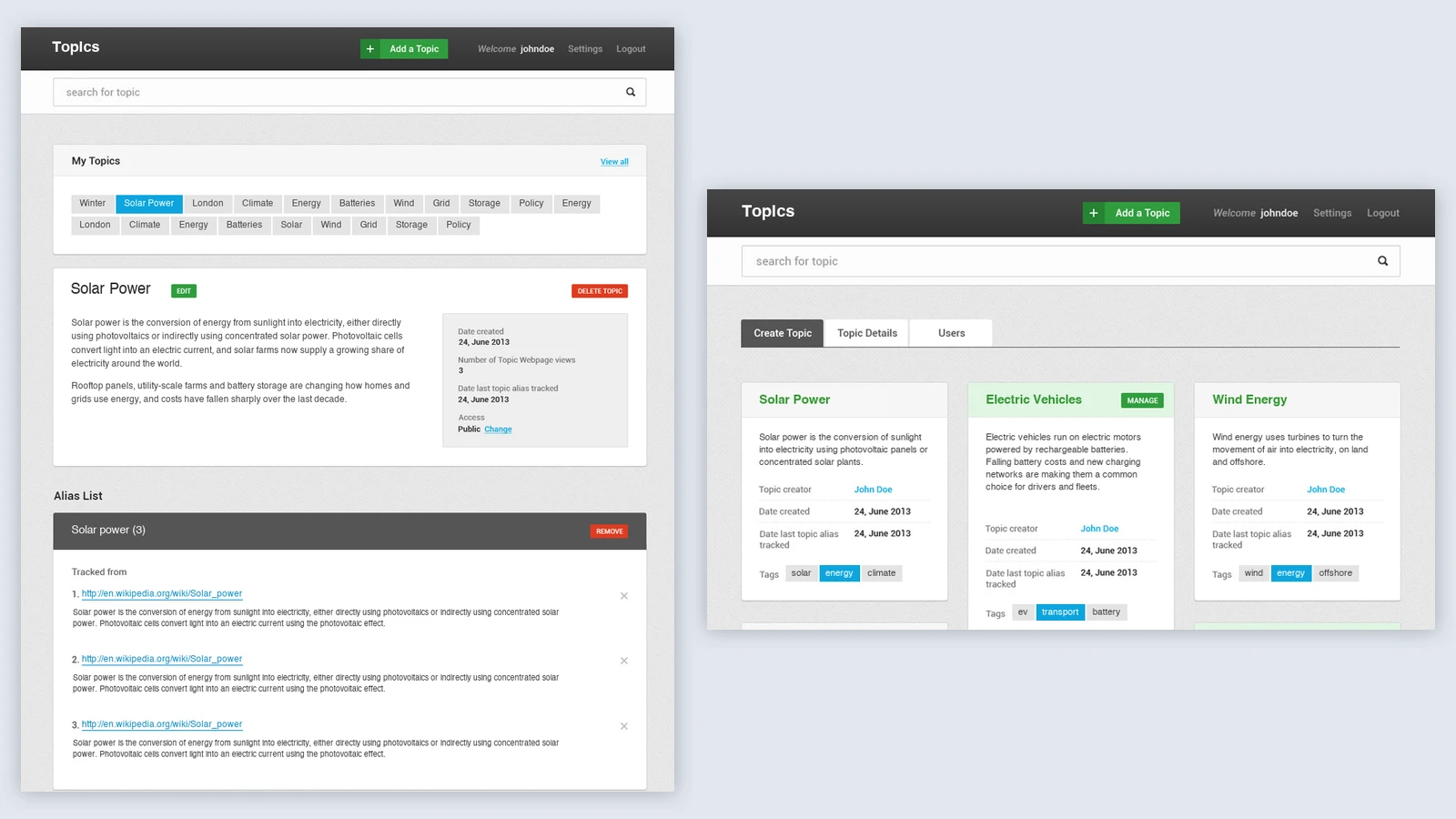
Research on the web is mostly copy and paste: a sentence from one page, a name from another, all of it losing its context the moment it lands in a document. A research-tools startup wanted to change that. Its idea was a browser extension that lets people highlight how a topic is mentioned on any webpage, a person, a company, the many ways each one is referred to, and a website that turns everything collected into a rich topic page. Toobler built both, in thirteen sprints in 2013: the Chrome extension, the website, and the API and database behind them.
Customer and context
The client is a research-tools startup. It came to Toobler with a detailed requirements document and, for each sprint, a goals document setting out what to build next, followed by feedback on what had been delivered. Its product lets contributors build up a picture of a topic, such as a company or a person, by collecting every way it’s mentioned across the web.
The unit of collection is the alias: “IBM”, “the technology company” and “the corporation” can all refer to the same company, and “Mr. Smith”, “the founder” and even “he” to the same person. Contributors track aliases on real webpages, keeping the words around them and the page they came from, and each topic gets its own page on the website that visualizes what has been collected.
The challenge
- Capture context, not just text. Every tracked alias needed the words before and after it, the page it came from and a way to find it again on that page later.
- Work on any webpage. The extension had to sit on top of any site without hiding its content, and recognize the same alias wherever it appears on the page.
- Show what’s been collected. Contributors needed to see, on any page they revisit, which aliases they had already tracked, which they had chosen to ignore, and which were only selected.
- Turn the collection into something visual. Topic pages had to present the collected webpages and relationships in a way people could explore.
- Different people, different rights. Guests view, contributors work on their own topics, and administrators manage everything.
The solution
A Chrome extension for tracking aliases. The extension runs as a panel fixed to the top of the page, so it never covers the content, with a right-click menu as a shortcut. A contributor activates one of their topics, highlights text on the page and tracks it. The extension records the alias, up to 32 words before and after it, and the page’s address and title, and captures a thumbnail of the page. When an alias is selected, every other occurrence on the page is highlighted; the contributor can switch individual occurrences off and track the rest in one action.
Previously tracked aliases, highlighted on return. Whenever a contributor revisits a page, the extension highlights the aliases already tracked there, in different colors for tracked, ignored and newly selected text. Any tracked alias can be ignored, so it stays visible on the page but out of the topic’s data, or untracked entirely, with a warning first. Clicking a webpage on the website opens it with the right topic already active in the extension. Toobler reworked the tracking method part-way through, traversing the whole page body after analyzing cases where the surrounding text had been captured incorrectly.
Topic pages built from visualization regions. On the website, each topic has a page made of regions:
- HTML regions summarizing the webpages and aliases collected;
- an image collection, where thumbnails of the tracked webpages are arranged into labeled groups, managed by dragging images from a holding area into groups, and shown as a slider;
- a network graph of the relationships in the topic’s data, built by its own data algorithm, with common words filtered out.
Images are removed from the collection automatically when all of a page’s aliases are untracked.
Accounts, roles and administration. People register with email verification or sign in with LinkedIn, and can link an existing account to LinkedIn. Guests can search and view topic pages; contributors create, manage and track only their own topics; administrators manage all users and topics from dedicated screens with sorting, search, view counts and password resets. New accounts default to the contributor role.
Real-time, secure and documented. Updates reach the website and the extension in real time over Socket.io, the site runs over SSL with encrypted passwords, and every component was documented. Each sprint ended with test cases, defect tracking and retesting against the client’s goals and feedback documents.
A key workflow: tracking a founder across the web
- A contributor creates a topic for a startup founder and activates it in the extension.
- On a news article, they highlight “Mr. Smith”; the extension highlights every other mention on the page, and they track them all at once, each with the words around it.
- They also track “the founder” and “he” where the article clearly refers to the same person, and ignore one mention that doesn’t.
- Returning to the article a week later, they see every tracked alias highlighted, with the ignored one shown in gray.
- On the topic page, the article’s thumbnail appears in the image collection, ready to be grouped, alongside the network graph for the topic.
Engineering worth naming
- Context captured with every selection. Storing the surrounding words with each alias lets the extension find it again on the page and keeps its meaning intact.
- A browser extension that respects the page. A fixed panel, a context menu and clear highlight states make tracking fast without getting in the way.
- Visualizations driven by data. Image collections and network graphs are configured from stored data, so topic pages update without custom code.
- Built sprint by sprint against the client’s goals. Thirteen sprints, each scoped by a goals document and closed by feedback, testing and fixes.
Results
Toobler built a research-tools startup’s product in thirteen sprints: a Chrome extension that tracks how topics are mentioned across the web with their context, highlighting that persists across visits, and a website with topic pages, image collections, network graphs, roles and administration, all connected in real time.
For any product that collects knowledge from the open web, the lesson is to capture context at the moment of collection, make it visible wherever the user returns, and turn what’s gathered into something people can explore.
Related work and capabilities
- Case study SaaS Product Engineering · WordPress · SEO
Every post on a WordPress site, audited in one place
How Toobler built PostGuide, a SaaS that audits, scores and fixes website content for SEO, from NLP-based scoring and a WordPress plugin to Paddle billing.
Proof, engineered
Case studies from Toobler — real platforms engineered across event technology, construction and digital twins. The work behind the claims.
SaaS Product Engineering
SaaS products outgrow the architecture that launched them. Toobler designs, builds, scales and re-platforms software products for SaaS companies, ISVs and funded startups.